
Description
DIALux Bridge for Revit brings lighting design into the BIM workflow
Open image →
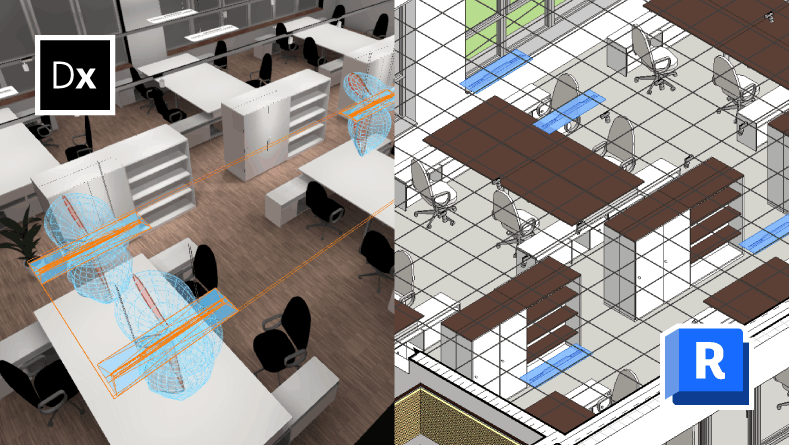
Lüdenscheid, September 3, 2026 – DIAL introduces DIALux Bridge for Revit, a new plug-in that connects professional lighting design in DIALux with Autodesk Revit. For the first time, lighting data can be transferred between the two applications, creating a more seamless workflow between lighting design and BIM coordination.
Lighting designers can transfer complete lighting models from DIALux to Revit via IFC, including luminaires, positions, orientations and relevant product information. Existing luminaire layouts created in Revit can also be transferred to DIALux and used as the starting point for detailed lighting design.
A seamless workflow from Revit to DIALux and back
DIALux Bridge for Revit uses IFC as the backbone for data exchange between the two applications.
Architectural models created in Revit can be exported as IFC files and imported into DIALux, where lighting designers can develop and calculate their lighting concepts using the full capabilities of specialised lighting design software.
Once the lighting design is complete, the lighting model can be exported from DIALux as an IFC file and loaded directly into DIALux Bridge for Revit. The plug-in provides a structured overview of the building and its spaces and transfers the planned luminaires into the Revit model.
This creates a consistent workflow between architectural BIM coordination and professional lighting design while reducing the need for manual data transfer and duplicate work.
Native Revit Families based on an international standard
When importing the lighting model, DIALux Bridge for Revit automatically creates native Revit Families for the luminaires.
The Families are based on the international ANSI/IES TM-32-24 standard. All 27 mandatory parameters are generated automatically and populated with the corresponding luminaire data from DIALux.
As a result, luminaires are transferred into Revit not simply as geometric objects, but as structured BIM elements containing the information required for further coordination and project development.
Connecting early design and detailed lighting planning
DIALux Bridge for Revit also supports workflows in which luminaires have already been positioned during the architectural design phase.
Existing luminaires from Revit can be imported into DIALux as clearly identified placeholders and then replaced with real products from the DIALux luminaire database. This allows preliminary layouts to be used directly as the basis for professional lighting design.
More information about DIALux Bridge for Autodesk Revit is available at www.dialux.com.
About DIAL
Since 1992, DIAL has been developing the lighting design software DIALux. As the undisputed global market leader, DIALux is used by over 750,000 planners worldwide for all aspects of lighting design. Currently, a rapidly growing number of 443 lighting manufacturers from across all continents present themselves to planners in a unique way as DIALux Members.
Through the DIAL Academy, DIAL provides in-depth knowledge with practical training in lighting design, lighting technology, and lighting control, as well as intelligent building automation.
For more information, visit www.dialux.com.